Zenburn themes
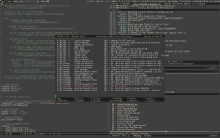 Here is a list
of my
Zenburn themes and tweaks, and a description of how I use
them. From the above screenshot; Emacs theme
and rxvt-unicode colors were already available on
the Zenburn home
page. Those were the two most important to me, but I had to color
everything else to really benefit from it's low-contrast color
scheme.
Here is a list
of my
Zenburn themes and tweaks, and a description of how I use
them. From the above screenshot; Emacs theme
and rxvt-unicode colors were already available on
the Zenburn home
page. Those were the two most important to me, but I had to color
everything else to really benefit from it's low-contrast color
scheme.
1. Starting with the awesome window manager theme, it
is now available on a number of different places. Maybe it would be
best to grab it from the
awesome wiki
page. Note that from awesome 3.4 it will be a part of the
standard distribution.
2. Alpine is my mailer of choice so a theme for it was
one of the first I did, take a look at
my .pinerc
for the color setup. I also have
a gallery
dedicated to it so you can see how various parts of Alpine look
using those colors.
3. I was interested in having Zenburn in the console too, but
didn't want to use ctheme, so I came up with a workaround
in my shell init
file.
4. I made a very basic
Zenburn vimperator
color scheme. Mostly based on the color-theme-zenburn for
Emacs, so that the modeline/statusbar and command lines match on my
system. Why would I use Vimperator? See
my vimperator
setup for Emacs users.
5. Recently I was testing a new terminal
emulator, ROXTerm, and wrote
a zenburn
theme in the process.
5. My Gajim has Zenburn, but it's not simple to achieve and
share, you can see the full
explanation here. From
my short excursion into purple land the
Pidgin
zenburn scheme was born (used with the GTK+ theme
plugin).
7. Emacs
Zenburn theme is used trough the ColorTheme package. It
has faces for many modes but didn't have any org-mode
faces. I patched
color-theme-zenburn.el to include org-mode faces and I submitted
the patch to the theme author. Note that it took a while but
eventually got included in the standard theme.
8. I still use many X apps like xmessage, xman, xclipboard,
xdiary... which also use colors from
Zenburn, my
.Xdefaults has settings for them and a good number of other apps
too.